Built on Salesforce Powered by AI Specialized for Real Estate

From lead alert to site visit — sales automation in your agent's pocket.

SalesApp is a mobile sales solution for real estate teams. Instant lead alerts, one-click calling, project master access, and WhatsApp share — every action recorded back to Salesforce in real time.

Built for the field, not the desk. SalesApp gives sales reps everything they need to qualify, engage, and convert leads from a single screen — without ever opening a laptop.

SalesApp leads list screen
Trusted by real estate leaders
Salesforce-native

A sales solution that lives inside your Salesforce org — not next to it.

Built for Salesforce real-estate teams Leads · Contacts · Activities · Sync
01 / Native-minded

Maps to your existing objects

Works cleanly with Lead, Contact, Activity, and your routing logic. Engagement history writes back to Salesforce automatically.

  • Role-based access & data security
  • Team queues & assignment groups
  • Auditable activity timeline
Real-time pipelineField updates · scoring · routing · activities
02 / Real-time sync

Every call, SMS, and share — logged instantly

Outbound activity (call duration where supported, SMS, WhatsApp shares) is captured and synced back to the lead record without manual data entry.

  • Instant lead alerts on assignment
  • Engagement history auto-populated
  • Task sync with Salesforce activities
Zero double-entryOne source of truth across web & mobile
03 / Privacy & control

Your CRM data stays your CRM data

No third-party lead silos. No data shipped to external tools. Records live in your Salesforce org and respect your access policies.

  • Stored in: your Salesforce org
  • Shared with 3rd-party tools: No
  • Real-time sync: Yes
Governed footprintMinimal delivery data · secure sync
Use cases

High-impact automations for the field sales team.

Reduce manual work, improve lead quality, and make every conversation count — from the moment a lead is assigned to the day a unit is booked.

Home Page

One screen. Your entire pipeline.

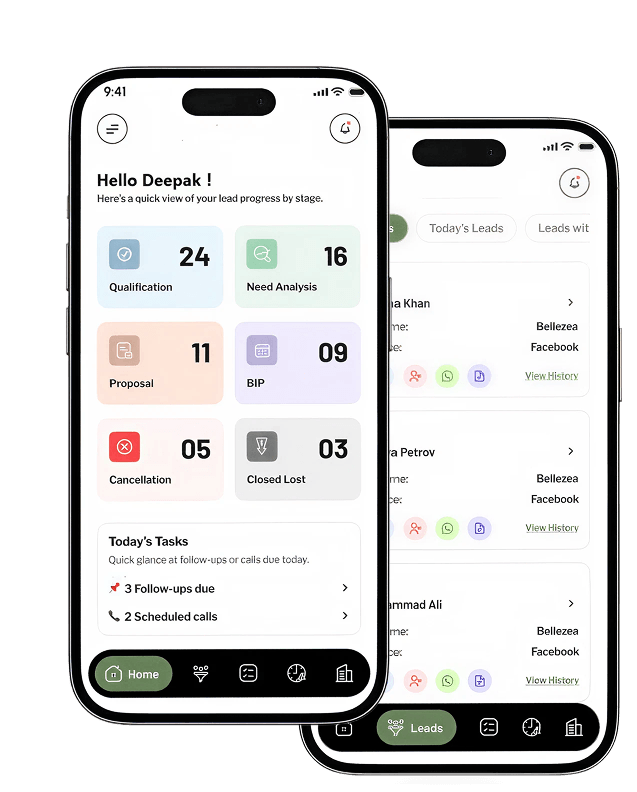
Stage-wise lead counts, today's tasks, and one-tap shortcuts to the highest-priority actions — designed for agents who live on the road, not at a desk.

  • Clear visibility into the lead pipeline with stage-wise counts
  • Quick access to high-priority actions with a single click
  • Easy access to tasks with enhanced visibility and tracking
SalesApp home dashboard SalesApp leads list
Engagement

Call. SMS. WhatsApp. One tap each.

Open a lead, hit a button, and you're talking. Predefined templates handle the routine, while every action — including call duration where the OS allows — is logged back to engagement history.

  • One-click calling for instant engagement
  • Predefined SMS templates for faster, on-brand replies
  • Share fact sheets, brochures & layouts via WhatsApp as clickable links
  • All actions recorded to engagement history for future reference
SalesApp active call screen SalesApp SMS templates
Tasks & Reminders

The follow-ups never fall through.

Upcoming and overdue tasks at a glance, synced both ways with Salesforce. The full activity timeline — phone calls, follow-ups, site visits, emails — sits one tap deep on every lead.

  • Quick access to upcoming and overdue tasks
  • Seamless task sync with Salesforce
  • Complete activity history and tracking for better follow-up
  • Built-in navigation to client or site visit locations
SalesApp action history timeline
Project Master

One source of truth for every project.

Brochures, price sheets, master plans, available units — all in one place, always current. Share with prospects in a tap, knowing the version they receive is the right one.

  • Centralized access to all project marketing materials
  • Always the latest, up-to-date content for every agent
  • Simple to share via WhatsApp, email, or SMS
SalesApp project master list
Try SalesApp

Run SalesApp with 5 reps for 2 weeks. See it work on real leads.

Evaluate the engagement workflow, lead routing, and call tracking on your own data before rolling out company-wide. The trial is scoped tight so you can measure impact without pulling your team into a long deployment.

1
Call Tracking

Monitor outbound call activity and attempts, with call duration to the extent supported by Android & iOS.

2
Lead Management

Track and view the full lead lifecycle, from assignment through engagement and closure.

3
Dashboard Access

Visibility of Home Page and Task List in read-only mode — measure usage before opening up edits.

4
Instant Lead Alerts

Real-time push notifications the moment a new lead is assigned to a sales rep.

Trial scope

What's included in the evaluation

Duration
2 Weeks
Participants
5 Users
Setup
Same week
Reserve a trial slot
How SalesApp gets deployed

Six disciplined stages from kickoff to launch.

STAGE 01

Wireframes & Style Guide

  • Conceptual layout / visual structure of screens
  • Fields, sections & navigation flow
  • Color scheme, typefaces, and graphics
STAGE 02

Mockup

  • Rendering of app's full visual design
  • Layout, splash screen & app icons
  • Inner screen designs & screen slicing
STAGE 03

Documentation

  • Application & functionality specification
  • Architecture design
  • Development milestone plan
STAGE 04

App Development

  • Engineering to enterprise standards
  • Version release management with Git
  • Regular code reviews
STAGE 05

App Testing

  • User experience testing
  • Functional testing
  • Error handling & edge cases
STAGE 06

Release Assistance

  • Performance & security testing
  • Device, platform & cross-device compatibility
  • Play Store & App Store submission support
Why SalesApp

Real estate. Salesforce. Mobile. Done.

01 / DOMAIN

Built for real estate, not adapted to it

Every screen, field, and workflow is shaped around the lead-to-booking lifecycle that actually happens on a sales floor.

02 / PLATFORM

Salesforce-native by design

SalesApp doesn't replace your CRM — it lives inside it. Lead routing, assignment rules, and activities all stay in your org.

03 / MOBILE

Native-feel on iOS and Android

One-tap actions, offline-tolerant flows, and screen layouts tuned for portrait phones — agents work fast even on the move.

04 / CONTROL

Role-based access & data security

Every action audited. Every record governed. Reps see what they should — and only what they should — with permissions managed directly from your Salesforce org.

Mobile compatibility

SalesApp is designed for portrait phones — both Android and iOS. Tablet support is not currently included.

Platform
OS
Orientation
Resolution
AndroidOS 10 – 13
iOSOS 12 – 16
Portraitonly
Mobiletablets not supported

Ready to see your sales floor on a phone?

Book a 30-minute walkthrough. We'll map SalesApp to your Salesforce setup, your project master, and a 2-week trial tailored to your team.